Introduction
Both of my client projects, the Marienmühle restaurant website and the KDS Werkzeugbau corporate site, needed the same thing: an assistant that answers questions about the business and can actually do things, like take a reservation or a contact request. Instead of building two chatbots, I built one AI chat stack on top of the Model Context Protocol for both. KDS Werkzeugbau is the first website where it is released and working in production; the Marienmühle integration is built and follows next. The same agent loop and a shared test suite, wrapped around two completely different businesses.
A guest asks “Kann ich Samstag einen Tisch für 6 Personen buchen?”. A procurement engineer asks “Bearbeitet ihr auch Laserprojekte?”. Two different domains, one architecture. This page is the story of that architecture and the lessons that shaped it, the parts you cannot learn from a demo.

Why MCP?
The obvious approach is a chat backend with bespoke function calling: wire an LLM to a handful of hand-written functions and call it a day. I decided against that. If an assistant should be able to check opening hours, the business logic deserves a proper interface: validated schemas, authentication, and the ability to serve more than one consumer.
MCP gave me exactly that boundary. Each business exposes its capabilities as tools on an MCP server. The website chat is only the first client of that server: the chat backend discovers and calls tools via JSON-RPC, and any external MCP client, Claude Desktop for example, can point at the same endpoint and work with the same toolbox. When the next wave of assistants arrives, my clients' capabilities are already tool-callable.
One tool layer, two audiences: the embedded assistant on the website, and whatever MCP-speaking client shows up next.
Architecture
Both monorepos follow the same Turborepo layout you saw in the project pages above, with one addition: a fourth application, : a NestJS service that speaks Streamable HTTP (stateless, JSON responses) on . It is deliberately small: the tools live close to the schemas, and everything else is delegated to the REST API.
- web
- api
- email-worker
- mcp-server
- common
- database
- logger
- ui
- eslint-config
- typescript-config
The interesting part is the chat module inside the existing NestJS API. It is an MCP client, and I wrote it with plain JSON-RPC calls instead of an SDK, because it only ever needs two methods: to discover the toolbox and to execute a tool. The full request flow looks like this:
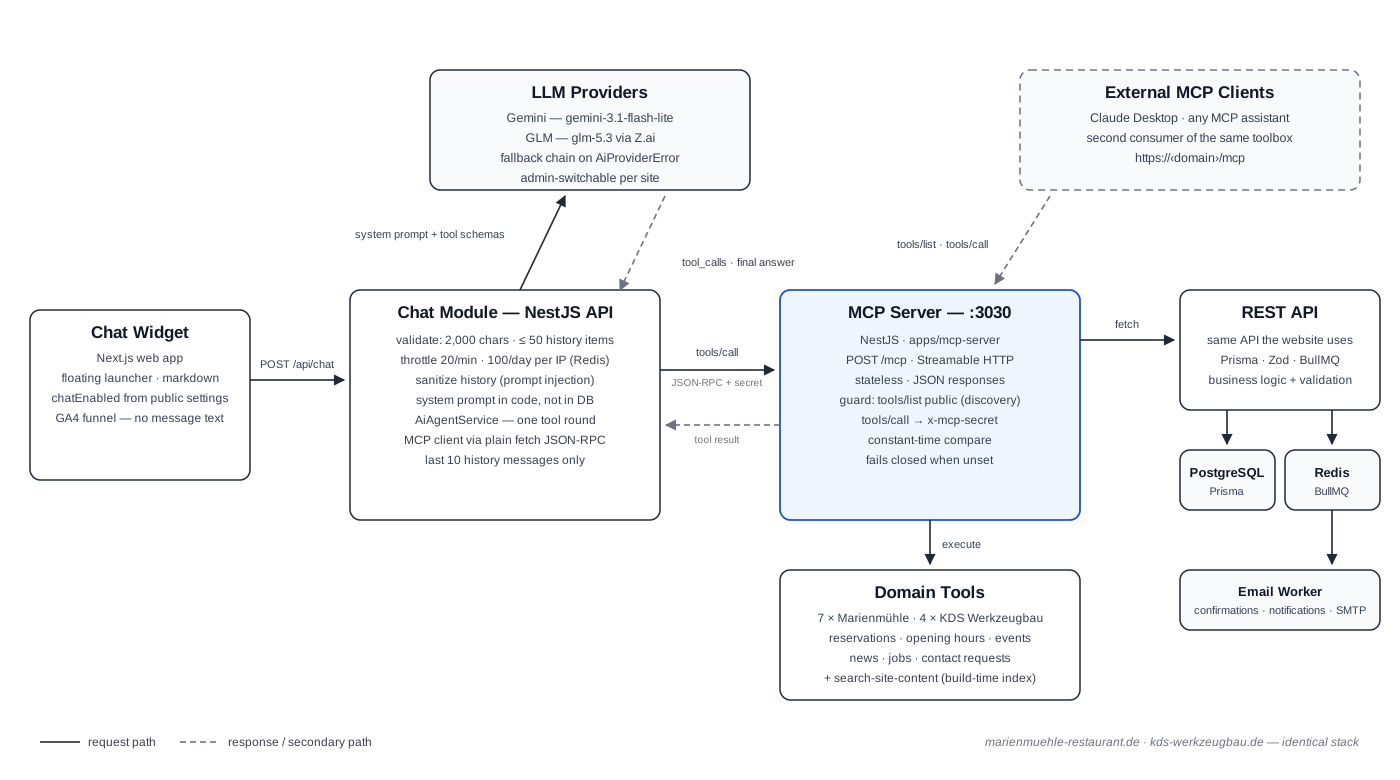
The agent loop, step by step:
- The widget sends with the message and the last 10 history entries.
- The chat module validates the request, checks the rate limits and sanitizes the history (more on that below).
- The agent fetches the available tools via and converts their JSON schemas into the provider's tool format.
- The LLM answers, or requests one or more tool calls.
- Each tool call runs against the MCP server, which enforces auth and calls the REST API.
- The tool results are appended and a second LLM call produces the final answer the visitor sees.
The provider layer is an interface in the shared package with two implementations: Gemini () and GLM ( via Z.ai). If the primary provider fails, the agent automatically retries with the other one; only if all providers fail does the visitor see a friendly “try again later” message. Which provider a site uses is a runtime setting the admin can switch; I changed the default myself after comparing both in production.
The Toolbelt
Eleven tools across the two sites: seven for the restaurant, four for the manufacturer. The overlap is intentional: contact requests and site search are the same problem in both businesses, so they are the same tool.
| Tool | Marienmühle | KDS Werkzeugbau | Purpose |
|---|---|---|---|
| check-availability | ✓ | ✗ | Available time slots for a date and guest count |
| create-reservation | ✓ | ✗ | Books a table, after re-checking availability itself |
| get-opening-hours | ✓ | ✗ | Season-aware hours incl. holidays, returns a reservationsPossible flag |
| check-season | ✓ | ✗ | Current Winter/Sommer season of the restaurant |
| get-events | ✓ | ✗ | Events by date range or “upcoming” |
| get-news | ✗ | ✓ | News & posts with a 365-day forward window |
| get-job-openings | ✗ | ✓ | Active job listings incl. tasks, profile and benefits |
| create-contact-request | ✓ | ✓ | Creates customer + inquiry, triggers confirmation and notification emails |
| search-site-content | ✓ | ✓ | Keyword search over the build-time website index |
Every tool returns two things: , a German, model-facing text block, and with the machine-readable data. The tool descriptions are also written in German, phrased as instructions to the model, because that is who reads them:
That last sentence is doing real work: it is the first line of defense against the model confidently claiming an action it never performed.
Discovery Is Safe, Execution Is Not
The MCP servers are exposed on the public internet, so authentication had to be part of the design from day one. The rule I settled on: discovering the toolbox is safe ( only reveals metadata), but executing anything is not. A NestJS guard inspects every MCP method and allows a small set of public methods; everything else requires a shared secret, compared in constant time.
One detail I want to highlight: the guard fails closed. If no secret is configured, every protected call is rejected. A misconfigured deployment should be obviously broken instead of silently unprotected.
The System Prompt Is Code
The system prompt started its life as an editable field in the admin settings. I removed that. The prompt defines how the assistant behaves: which actions it may take, which tone it uses, what it must never do. I do not want a settings form to be able to silently rewrite that. Today the prompt is assembled in code and can only change through a pull request, code review and version control.
Two quirks from the trenches: the prompt contains a bilingual language rule that explicitly outranks other language instructions, because the GLM provider appends its own German rules block and the two occasionally disagreed. And the prompt is passed through a dedicated field instead of a message, because Gemini's converter silently skips system-role messages, which would have dropped the prompt-injection guardrail entirely.
Actions That Fail Closed
The restaurant only takes online reservations in winter, indoor only. That is exactly the kind of rule a chatbot gets wrong by cheerfully booking a Biergarten table in July. I encoded the policy in three layers, so no single failure can break it:
- The tool description states the rule, in German, for the model to read.
- The availability API enforces it: the source of truth stays on the server.
- returns a computed flag, so the model never even offers a booking that cannot be fulfilled.
And trusts nobody, not even itself. It re-checks availability right before booking, and if the check fails or cannot be verified, it refuses and reports that nothing was created. The model gets an honest result it cannot misrepresent:
Build-Time Site Search: a Poor Man's RAG
Visitors ask questions the structured tools cannot answer: “Gibt es einen Parkplatz?”, “Wie groß ist der Mühlenraum?”. All of that information already exists on the website itself. So instead of a vector database, the MCP server ships a static content index that is generated at build time from the Next.js prerendered HTML: a script walks the build output, strips navigation and boilerplate, and writes into the server image. The tool scores keyword matches over that index at runtime, with no embeddings and no runtime dependency on the web app.
The scoring is German-aware in a low-tech way that works surprisingly well: substring matching exploits German compounding, so “gast” matches “Gaststätte” and “fräs” matches “Fräsmaschine”, while a stopword list keeps filler words from dominating long pages. Routes backed by the database (news, opening hours) are excluded from the index on purpose, so it can never serve stale copies of data that has dedicated live tools.
My favorite detail is in the Dockerfile: the MCP server image builds the entire web app into a throwaway directory just to prerender the pages for the index, and the extract step then deletes the build output. The index is always in sync with the shipped website, because it is the shipped website.
Provider Lessons: Small Bugs, Big Lessons
Supporting two LLM providers means hitting the weird edges of both. Four lessons that cost me real debugging time:
Zod schemas must serialize for the LLM
Tool arguments are validated with Zod schemas that also generate the JSON schema the model sees. Required fields must use instead of a check: a refinement does not serialize, which leaves the model unaware that a field is mandatory. The result: the model called tools with empty arguments.
A fallback that never fired
The provider fallback chain silently did nothing for a while. The reason: providers threw plain objects with the HTTP status buried in the message string, so the fallback logic, which inspected , never matched. The fix was a typed class. Generic errors are now programming errors that surface immediately; provider errors are retryable events.
Gemini rejects full JSON Schema
Gemini answers a fully valid JSON schema with a 400 (). The Gemini provider recursively strips and keys before sending. Related: the API key travels in the header, not the URL, so it never shows up in access logs or proxy traces.
GLM's reasoning-only responses
GLM occasionally returns a finish reason of with an empty field and the actual answer hidden in . The provider falls back to that field when content is empty, an edge case I first met as a flaky live test, documented as a retry in the spec.
Safety Rails
A public chat that can write to a production database needs rails. The ones I consider non-negotiable:
- Prompt injection via history: the client sends its own conversation history back with every request. Every entry is sanitized, only and roles survive, and anything else is demoted. A client must never be able to smuggle a message into the prompt.
- PII does not re-enter the model: tools strip personal data from results before they return. The contact-request tool answers with only an id and the subject; the reservation tool deletes the nested guest object, because a caller using another guest's id path could otherwise surface someone else's data.
- Cost caps: messages are capped at 2,000 characters, history at 50 entries (the agent uses the last 10), requests are throttled at 20 per minute, and a Redis counter limits each IP to 100 messages per day.
- DSGVO-clean analytics: the chat reports an event funnel to Google Analytics (opens, conversations, drop-off per message index, response times), but never the message text itself.
- A kill switch: the whole feature hangs on a runtime setting; the widget does not even render when it is off.
Testing an AI Feature
“It sometimes says something slightly different” is not a valid test expectation, but “the widget opens, validation rejects a 3,000-character message, and a live request returns German text mentioning opening hours” is. I split the Playwright suite into layers, each with a clear contract:
- L1, widget mechanics: fully mocked API. Opening, typing, Enter to send, Shift+Enter for a newline, IME composition, error bubbles.
- L2, real backend, no LLM: the API runs for real; the tests assert validation errors and rate limits. None of these requests ever reach an LLM provider, so they are fast, deterministic and free.
- L2b, admin round-trip: toggling the chat in the admin panel really enables and disables the widget, and restores the previous state afterwards.
- L3, live smoke (opt-in): with the tests talk to the real LLM and the real MCP server, asserting loosely-grounded regexes instead of exact strings.
The part I am most pleased with: the chat spec files run in both repositories unchanged apart from a small config block holding the domain and test prompts. The chat stack became a product template: the second integration reused the harness, the guard and the tests, and only the tools needed adapting.
Deployment
The MCP server is just another service in the Coolify stack. Caddy routes on the main domain to the server container (port 3030), next to the existing route to the API. That means the toolbox is reachable at and , on the same origin as the website with no extra infrastructure. Images are built per app by GitHub Actions and pushed to GitHub Container Registry, and the containers use healthchecks because the slim Node images do not ship curl.
What MCP Bought Me
- A second client for free: the same tools that power the website assistant work from any MCP client. Point one at the public endpoint and it can check opening hours or news with the exact logic the website uses.
- Provider independence: the admin can switch between Gemini and GLM at runtime. I swapped the default myself after comparing both in production, with no code change and no redeploy.
- A reusable template: architecture, agent loop, guard, provider layer and tests were written once and shipped to a second client in a fraction of the time.
- A clean seam: because the chat only talks to the MCP server, the AI layer can evolve (more tools, more providers, more clients) without touching the core system.
If you want to see it in the wild: the assistant is live on kds-werkzeugbau.de, the first website running this stack in production. Ask it what the company does, or which jobs are open. The full case studies for both projects are on the work page.